Deposit metadata
All images in your filelist should have metadata that provides additional information about the image (such as captions and copyright information). Some metadata is optional, while other metadata is required for each image.
The following metadata can be inserted:
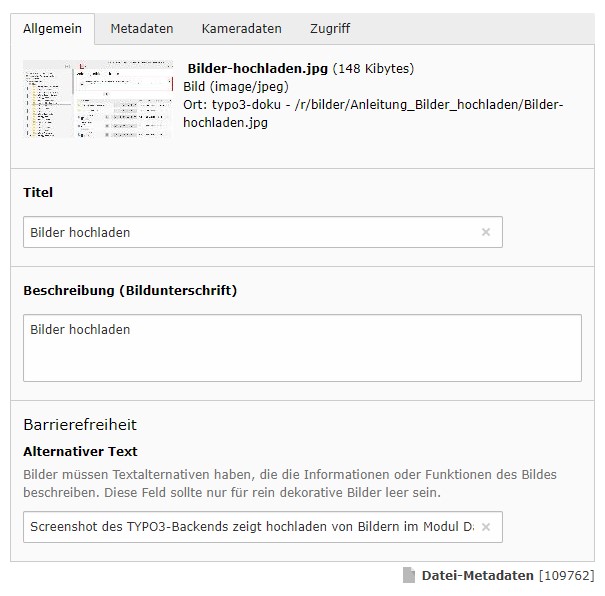
In the "General" tab:
Title (optional): If you move the mouse over an image in the frontend, the text entered in this field is displayed in a small label.
Description/caption (optional): The text entered in this field is displayed as a caption in the frontend.
Alternative text (mandatory): This text describes what can be seen on the image. For screenreader users, this text will be read aloud. Try to paraphrase the important image information in the text. The goal is that people who do not see the image know what is on it.
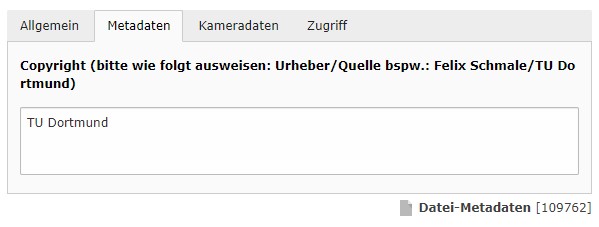
In the "Metadata" tab:
Copyright (mandatory information): The source of the image is a mandatory information and must be deposited with each image accordingly. If this is not the case, your website does not meet the legal requirements. You can find detailed information on how to insert the copyright information for various sources on our topic page on the copyright notice.
Tips for formulating alternative texts
- Avoid introductory words such as "The picture shows..." or "To be seen is...".
- Complete sentences are not always necessary: "Professor at a lectern in the lecture hall" - "Student with a tablet in front of a bookshelf in the library."
- When describing in complete sentences, use active verbs in the present tense. "Three students looking at a book together."
- For graphs or charts and the like, describe:
- Type (chart, table, mind map, painting...).
- Structure, format, layout and reading direction
- Data of the figure, axis labels, clearly recognizable points, etc.
Translate metadata
If you have a single-tree website, you should also translate your metadata.
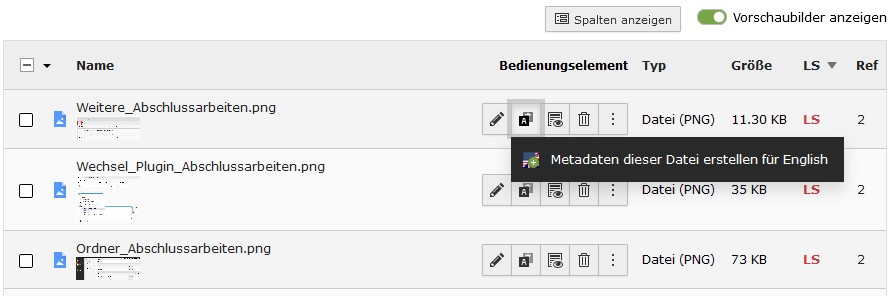
To do this, click on the globe icon (see screenshot "Translate image") next to the respective image and then select the British flag. Now you will get to the same metadata interface as before, but this time for the English version. Enter the translated metadata there and save your selection.