
Formulas with LaTeX
To display mathematical and simple chemical formulas, you can integrate LaTeX and mhchem code into your TYPO3 site using MathJax.
These instructions are intended for users who are already familiar with these markup languages. Please note that the TYPO3 team does not provide support for creating formulas with LaTeX or mhchem.
You can find more information on the following pages:
As a delimiter in our installation
- for formulas in the line \\( and \\ )
- for offset, centered formulas \\[ and \\]
are used.
$ or $$ are not accepted as delimiters.
LaTeX
Display on the website
Formulas can be in continuous text: \( \int_0^\infty \mathrm{e}^{-x}\,\mathrm{d}x \)
Associated LaTeX code
\\( \\int_0^\\infty \\mathrm{e}^{-x}\\,\\mathrm{d}x \\)
Display on the website
Formulas can also be displayed centered in a separate line.
\[ \int_0^\infty \mathrm{e}^{-x}\,\mathrm{d}x \]
Associated LaTeX code
\\[ \\int_0^\\infty \\mathrm{e}^{-x}\\,\\mathrm{d}x \\]
mhchem
Display on the website
The mhchem package is ideal for setting chemical formulas and reactions.
\(\ce{C6H12O6 + 6O2 -> 6CO2 + 6H2O}\)
Associated mhchem code
\\(\\ce{C6H12O6 + 6O2 -> 6CO2 + 6H2O}\\)
Insert Mathjax
To ensure your formulas display correctly, you must insert the MathJax JavaScript at the top of the page, or at least before the first content element containing a formula.

To do this, place an "Insert Records" content element in a suitable location on your page to include the JavaScript.
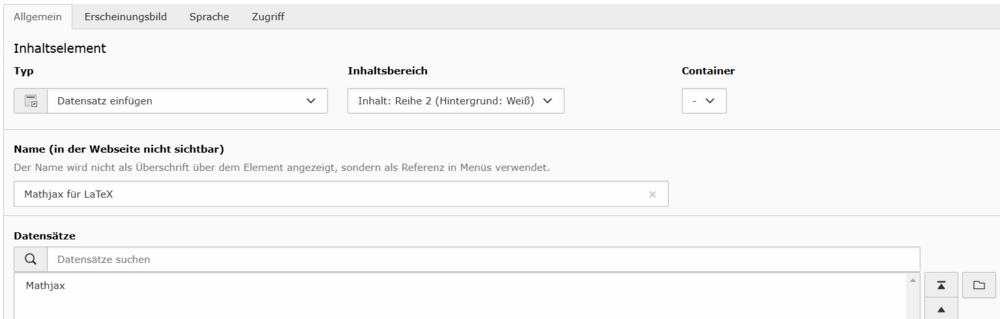
We have provided a template page titled "Mathjax" which contains the exact record you need to include via the "Insert Records" element.
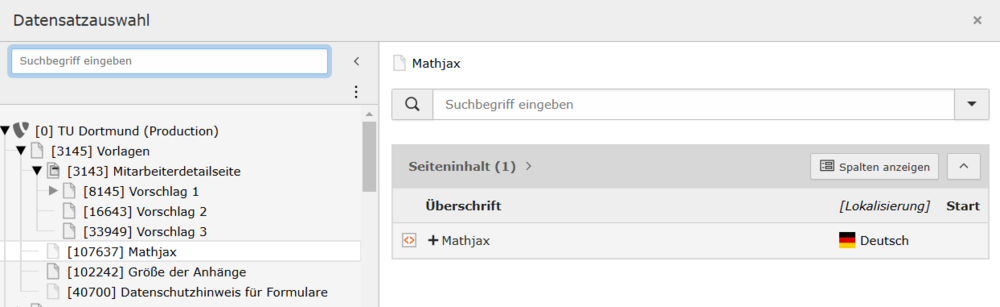
Please note: For dynamic content like news articles, you must insert the JavaScript on the actual page where the content is displayed (for example, on pages with a list or detail view). These pages can only be accessed by web administrators.