Labeling AI-Generated Content in TYPO3
Information as of: August 7, 2026
Where is the requirement to label AI-generated content regulated?
Since August 2, 2026, the EU AI Regulation (also known as the EU AI Act) has required operators to transparently label certain AI-generated content. Article 50(4) stipulates that text generated by AI that has not been reviewed by a human before publication must be labeled. Similarly, AI-generated images, videos, or audio recordings that qualify as “deep fakes” must be labeled: Article 3, paragraph 60 defines a “deep fake” as content that resembles real persons, places, objects, institutions, or events and would be mistaken by others as genuine or truthful. There are exceptions, such as for law enforcement purposes, artistic works, or satire.
Excerpts from the original text (as of July 31, 26)
Operators of an AI system that generates or manipulates image, audio, or video content constituting a deepfake shall disclose that the content has been artificially generated or manipulated. This obligation shall not apply where such use is authorized by law to detect, prevent, investigate, or prosecute a criminal offense. Where the content forms part of a work or program that is clearly artistic, creative, satirical, fictional, or analogous, the transparency obligations set forth in this paragraph are limited to disclosing the existence of such generated or manipulated content in an appropriate manner that does not interfere with the display or enjoyment of the work.
Deployers of an AI system that generates or manipulates text published for the purpose of informing the public on matters of public interest shall disclose that the text has been artificially generated or manipulated. This obligation shall not apply where the use is authorized by law to detect, prevent, investigate, or prosecute criminal offenses, or where the AI-generated content has undergone a process of human review or editorial control and where a natural or legal person holds editorial responsibility for the publication of the content.
“deep fake”means AI-generated or manipulated image, audio, or video content that resembles existing people, objects, places, entities, or events and would falsely appear to a person to be authentic or truthful;
Important Notes
- This topic page covers only those media types that can be tagged in the TYPO3 backend: images and text.
- The labeling of relevant videos and audio files must be done outside of TYPO3.
- The recommended actions are limited to the TU Dortmund University TYPO3 websites and should not be considered universally applicable.
- The recommendations are based on the current understanding of the EU regulation. Since the transparency requirement is still new, adjustments or further clarification may occur in the coming months.
What must be labeled?
Images: Mandatory Labeling for Deep Fakes
All AI-generated images classified as “deep fakes” must be labeled as such. This applies only to images that appear deceptively real and where it is not immediately obvious at first glance that they were artificially generated. In addition, they must bear a resemblance to real people, places, or events, etc. Clear-cut examples of deep fakes include the splicing of faces, extensive retouching of interior designs, or artificially animated scenes.
By contrast, images that (also) clearly depict fictional characters, are drawn in a comic-book or artistic style, or contain graphic elements are not considered deep fakes.
How to handle more ambiguous decorative images must be assessed based on context: For example, if an AI-generated image of a flower meadow could give the impression that it is a real photograph of the TU campus, it must be labeled as such in TYPO3. Otherwise, the labeling is optional.
Examples of Deepfakes
The following images were generated entirely by AI. At first glance and without local knowledge, it is not apparent that these are artificially generated images rather than real scenes from the TU Dortmund University campus.



The following image was manipulated using AI. Here, too, the added content cannot be recognized without local knowledge.


Texts: No Labeling Requirement Due to Editorial Routines
If AI-generated texts are reviewed, revised if necessary, and approved by a human before publication, there is no legal obligation to label them. Since the texts on TYPO3 websites routinely undergo such editorial review, there is no labeling requirement here. The backend nevertheless allows for an internal note to be added indicating that a text was created using AI, in order to transparently document internal processes.
Labeling Images (Deep Fakes)
Options in the TYPO3 Backend
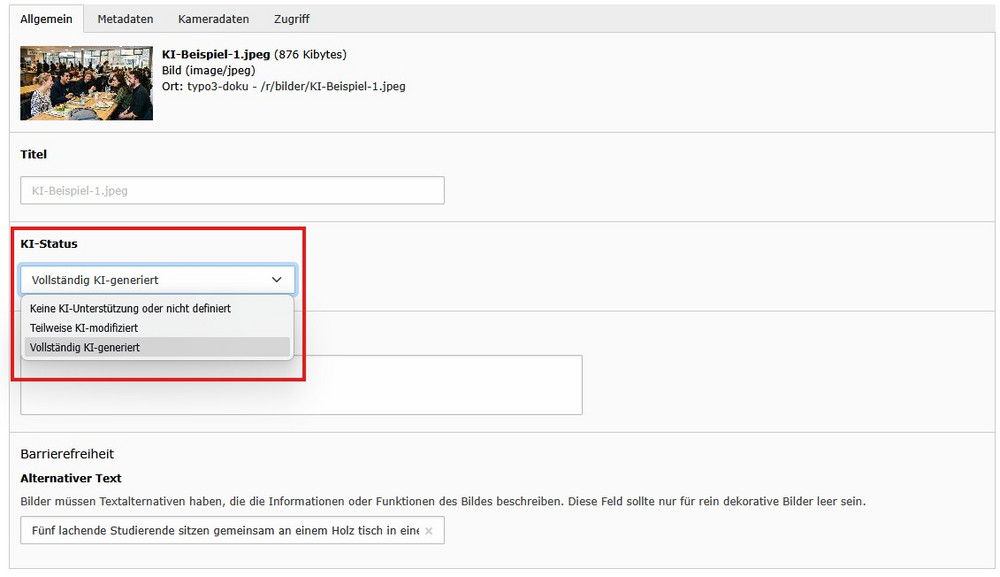
Partially AI-modified: The source material (e.g., a photo you took yourself) was created by a human but was subsequently altered or enhanced using AI.
Fully AI-generated: The image was created entirely by AI from scratch, without any human source material.
How do I label images?
The image is tagged using the metadata in the file list. Select the appropriate option from the dropdown menu.
Note: Both options automatically generate a watermark in the lower-right corner of the image. The watermark is always the same; however, please select the appropriate option to ensure the data is properly maintained. This will save you from having to make adjustments later if the legal framework or best practices change.
Retroactive Tagging
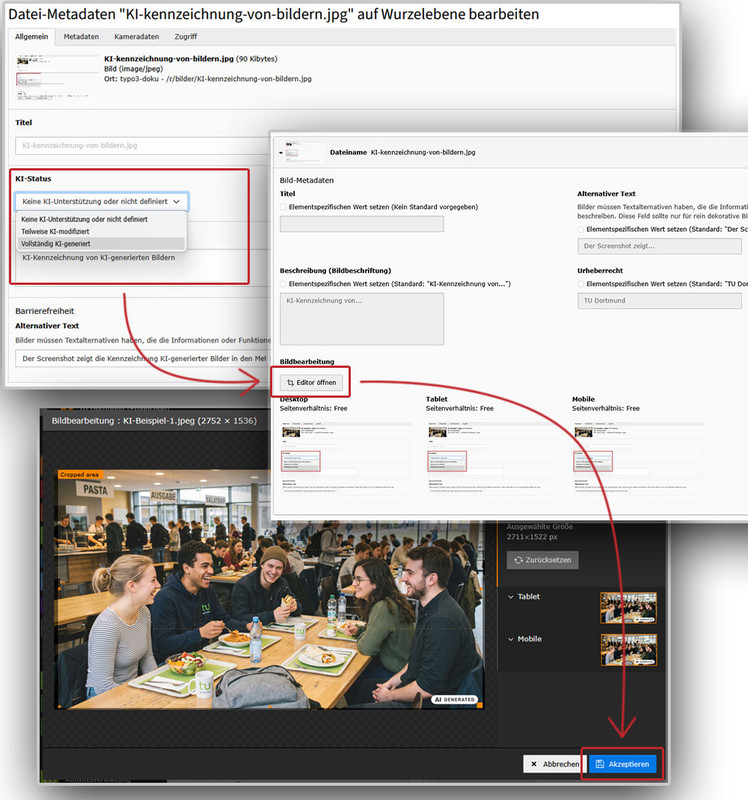
If an image is already in use, first change the metadata as described above. Unfortunately, this step alone is not enough to display the watermark.
You must also open the image editor at every location where the image has been embedded in a content element and update the newly created image sections by clicking “Accept.” Finally, save the content element as usual and clear the page cache if necessary.
Optional Tagging of Text
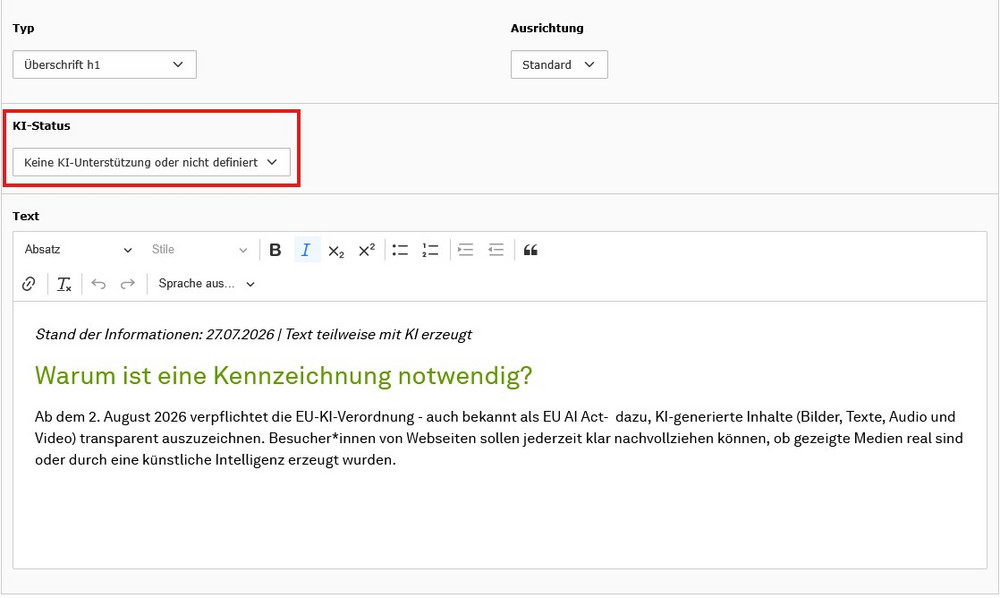
AI-generated texts need to be labeled only if they are not reviewed by a human before publication. Because the texts undergo editorial review in the TYPO3 system, labeling is not required. However, it is still possible to internally note in the TYPO3 backend that a text was created using AI in order to transparently document your own processes.
In this case, the label is applied directly to the corresponding content element in the backend. Select the appropriate option from the dropdown menu. This does not generate a label on the frontend. If you wish to make this information visible externally as well, this voluntary note must be manually added at the top of the respective page.